
This article is part of a series about creating GPX files for South Korea’s Cross Country Cycle Route.
In the previous article, we identified that we need to access the data for these Open Street Map relations: 4145848, 8371341, 8280693, 8281515, 8283141.
I used the Overpass Turbo tool (free, online) to download the data by following these steps.
- Navigate to https://overpass-turbo.eu
- Copy and paste these instructions:
[out:xml][timeout:25];
relation(4145848); // Replace with the required Open Street Map relation ID
out body;
;
out skel qt;- Change the relation Id to the desired value
- Click Run
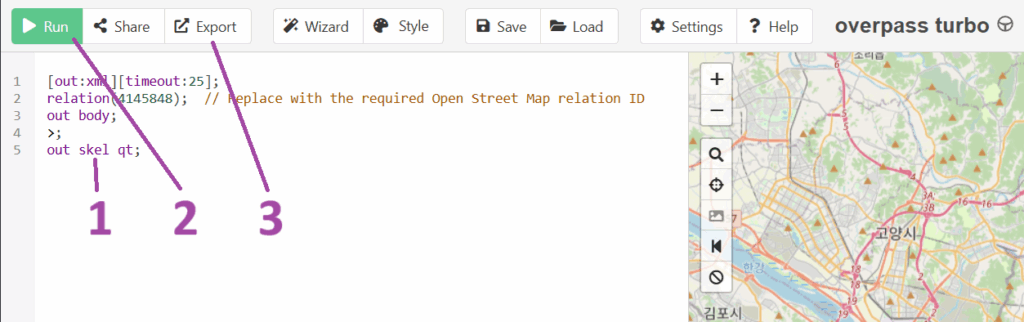
- Click Export, then download in the GPX format
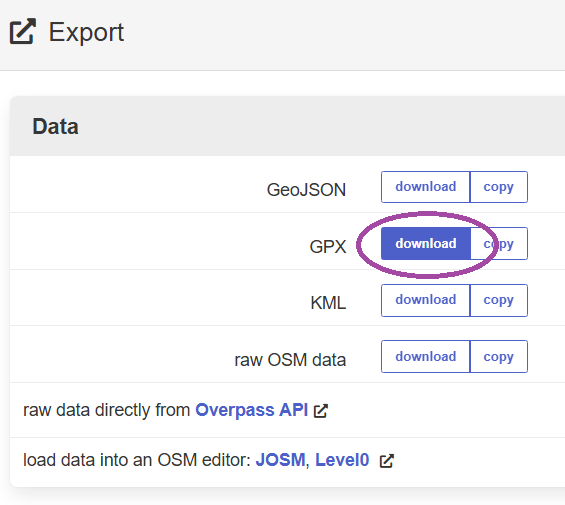
- Rename the downloaded file from ‘export.gpx’ to something more recognisable, such as ‘ARA Bicycle Path OSM.gpx’
- Repeat for each of the desired relation Id values.
The next article in the series is Trimming the cycle path GPX files.